Getting started
rdocgen is an alternative to python documentation generators that use standard docstrings. It uses inline comments as the source of descriptions and exports documentation in markdown files compatible with SSG tools such as VitePress.
Write documentation like this:
python
def example_function(
    value: int,  # input integer
    label: Optional[str] = None,  # optional label
) -> str:
Generated VitePress documentation will look like: 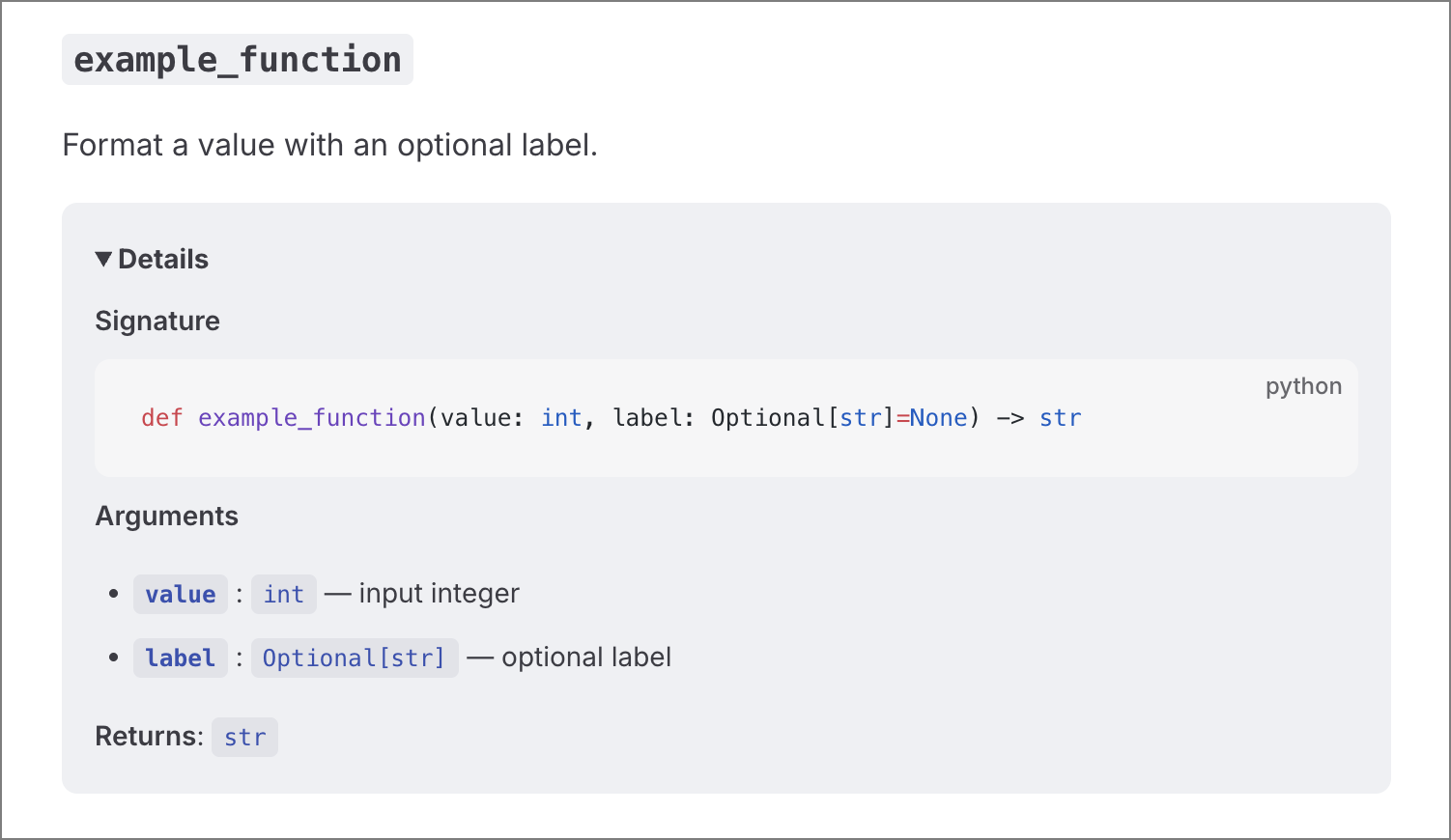
Why?
- It is simpler than docstrings.
- It provides a single source of truth, so documentation drift is less likely.
Use this project only if you do not rely on standard docstring tooling.
Usage
Install with
uv
uv tool install rdocgenpipx
pipx install rdocgenpip
pip install rdocgenSingle file
bash
rdocgen -c path/to/module.py -o ./out_docsWhen -c points to a single file, rdocgen writes a single output file (index.md by default) with all content for that file.
Directory
bash
rdocgen -c path/to/package -o ./out_docsInclude / exclude files
bash
rdocgen -c src -o ./out_docs \
  --include-path "rdocgen/**" \
  --exclude-path "**/tests/**"
Control hierarchy and output
bash
rdocgen -c src -o ./out_docs \
  --module-depth 2 \
  --project-name "My SDK" \
  --flatten \
  --index-title "API"
Visibility and types
bash
rdocgen -c src -o ./out_docs \
  --include-private \
  --include-dunder \
  --include-types class,function
Docstring rendering
bash
rdocgen -c src -o ./out_docs \
  --docstring-style python-fences \
  --code-fence-language python \
  --code-fence-suffix "copy showLineNumbers"
CLI flags (high level)
--code/-c: File or directory to parse.--outdir/-o: Output directory.--include-path/--exclude-path: Glob filters (repeatable).--module-depth: Grouping depth (1,2, orall).--project-name: Override the project name shown in indexes.--clean/--no-clean: Control output dir deletion (default is no deletion).--force: Allow deleting protected directories like.git.--dry-run: Print planned actions without writing files.--include-private/--include-dunder: Include hidden members.--include-types/--exclude-types: Filter byclass,function,enum,attribute.--sort:source-orderoralpha.--flatten: Emit a single output file.--index-title: Override root index title.--docstring-style:raw,python-fences, orpreserve.--code-fence-language: Default language for unlabeled fences.--code-fence-suffix: Extra tokens for opening fences (e.g.,copy showLineNumbers).--output-extension: Override.md/.mdx.--fail-on-parse-error: Abort on invalid Python files.
Notes
--cleandeletes the contents of the output directory, not the directory itself.- Without
--force, cleanup is blocked if the output dir contains hidden files, symlinks, or files that are not.md/.mdx. - This project only reads source files; it does not execute code.